Player Avatars
A player is a .dh-avatar standing where their pawn is. The client tells the server which one it wears, the server replicates that per player, and every client draws the model at the pawn’s feet, animated by how the pawn moves. Wearing nothing is a first class answer and draws the engine’s placeholder box — the same upright hull box every player was before avatars existed.
A machine that has never heard of the barcode a player wears downloads it, and draws it at your height rather than its own.
Choosing one
Section titled “Choosing one”client.avatar is the preference — a persisted string holding the barcode, empty for none.
avatar dev.example.avatars.nova:nova.dh-avataravatar noneavatarThe avatar verb is the whole selection surface from the console. With a barcode it writes the preference and sends the change in the same breath, so a swap survives the next launch. With none it takes the avatar off. Bare avatar asks rather than clears — clearing is what none is for, and a verb that wiped an avatar because somebody hit enter early would be the one mistake that cannot be undone without retyping a barcode from memory. Anything that does not end in .dh-avatar is refused on the spot, before the wire.
--avatar <barcode|none> overrides it for one launch, exactly the way --name overrides client.name: ClientPreferences.ResolveAvatar is ResolveName’s resolver with a different preference passed to it, so there is one rule for “a launch flag beats the store, and never writes back to it”.
The wire
Section titled “The wire”A joining client’s clientInfo (20) carries the barcode after the name and color: name, color and avatar travel together, at one moment, so a server never holds a player’s name without the rest of their appearance.
Mid-session there is one appearance message rather than one per field. clientThemeColor (19) was hard-renamed to clientAppearance, carrying the packed color and the barcode, and is sent whenever either changes. Two messages would have let a color change and an avatar change race each other into a half-applied appearance.
The server validates and refuses: the value must parse as a barcode whose asset path ends in .dh-avatar, and it is length-capped the way a name is (ClientAppearance.MaxAvatarBarcodeChars). A refusal keeps what the player already wore and answers with a clientNotice — the same idiom every other refusal uses. The server never needs the pallet; it is moving a string, not an asset.
The barcode is the truth, the index is the compression
Section titled “The barcode is the truth, the index is the compression”The pawn does not carry the barcode on every tick — it carries an asset table index, the same ReplicatedAsset identity channels a spawned asset already carried, resolved through the same assetTable (21). Wearing nothing is no index at all.
That is a per-tick compression and nothing more. The barcode is the source of truth on PlayerSession, and players prints it beside the name, so asking “who wears what” server-side is reading a string off a session rather than reversing a table.
Client-side the same question is one call: NetClient.AvatarBarcodeOf(NetEntityId pawn) turns a pawn into its barcode, or an empty string for a pawn wearing nothing or one whose table entry has not landed yet. A player list on either end is a loop calling one thing.
Identity is read from the newest snapshot rather than an interpolated sample — an index is not a quantity to smooth between, and blending one into another would spend a frame wearing an avatar nobody chose.
Drawing it
Section titled “Drawing it”One visual draws every pawn: PlayerPawnVisual, registered for NetKind.PlayerPawn. It resolves the index, submits the object at the pawn’s interpolated feet and yaw, and falls back to the placeholder box when there is no index, when the index does not resolve, or while the model is still loading. The box is the model path’s fallback rather than a second system beside it: a player wearing something and a player wearing nothing go through the same code.
- Animation, springs and eyes. The engine’s built-in locomotion poses the body (idle, walk and run, jump, noclip float), its spring chains hang off that pose, and its eyes and eyelids are stepped over the result. An avatar whose rig maps no hips and two whole legs stands in the rest palette the loader baked.
- Facing. A pawn’s yaw is the engine’s — zero looks down -Z — while a
.dh-avatarcomes out of a +Z-forward Unity pipeline the importer does not rotate. The visual adds the half turn (AssetForwardYaw) so players face where they are looking instead of away from it. - Crouch does nothing to the model. A crouching player’s box shrinks with their eye height; their model does not yet, because the locomotion has no crouch pose, and scaling a body to fake one would be a lie the animation would have to undo.
- Your own body is drawn only when the camera is not at your own eyes — a detached editor camera with a render eye to draw. It is read from state each frame the way
CursorVisibleis, never asserted at a transition. - A swap forgets what nobody wears. Two barcodes are two different entries in the object mesh cache, so changing avatar draws the new one — and a census drops the old once nobody in the session is wearing it. The same path covers a replicated reload of the same barcode, where the bytes behind an index changed under it.
Eyes and blinks
Section titled “Eyes and blinks”Every visible avatar looks around and blinks on its own, the local pawn included. The rig says what to move: the LeftEye/RightEye bones and eyeRotationLimits, and the eyelids shapes (blink, one name or a per-eye list, plus lookUp and lookDown). How the avatar behaves with them is its own: an optional root dh.eyes component, inherited down the inherits chain and overridable per field, turns the look or the blinks off and sets the personality and the blink timing. With both off the avatar’s face has nothing to drive, so no face step runs for it. The engine drives them with the same Core brain the Unity mods use, so an avatar behaves the same in both.
- Where it runs. A face step sits right after the spring step.
ClientEntityPoses.AdvanceFacesteps oneAvatarFaceRigper avatar at its submission, over the sprung pose, for pawns and spawned avatars alike. The avatar service steps the same rig. Every mobile shell composesClientEntityPosesandClientPresentation, so it gets eyes with no shell change. - Local, never networked. The brain runs on the render clock. Its seed comes from the barcode and the entity id, never the clock, so a capture replays.
- Rotation only. An eye bone keeps its position; it turns by the rig’s limit poses slerped by the brain’s yaw and pitch, the convention
DigitalHeavenEyeLookuses (EyeLookPosesin Core). The limits are authored in Unity’s frame and carried through the importer’s reflection. Bones under an eye ride along. - Blinks and lids. The weights ride the entity’s appearance to the skinner, combined as
max(authored, procedural)with whatever the shape already carries. A blink closes an eye adh.renderershape left open, and never opens one an author closed. - What it looks at. Other players’ heads are faces, and the local camera is one for everyone else’s avatar. A head counts as looking back when its view is within
client.anim.eyeLookMutualGazeAngleof the avatar. The avatar’s own velocity comes from its motion. Each avatar weighs the nearestclient.anim.eyeLookMaxPoisof them (default 8). The engine has no mirror or camera entities that play can see (mapcameraentities only frame captures), so there are no mirror points yet. - A name that resolves to nothing is one load warning naming the avatar and the shape, with any similar names the mesh does carry. A shape only a rigid mesh carries does not count: only a skinned mesh’s morphs run per frame.
--render --spawn <avatar> --spawnView face photographs it over simulated time; see offscreen rendering.
Tuning
Section titled “Tuning”Each field of Core’s EyeLookSettings is a local preference named client.anim. plus the field name, first letter lowered. The preferences are built from Core’s EyeLookSettingFields.All, which holds each field’s range and help once, so a game mod that exposes the same tuning (BONELAB’s [DigitalHeavenAnim] entries) offers the same names, ranges and defaults. The client refills its settings from them every frame, so a console change lands on the next one. An avatar’s dh.eyes look axes pick between each …Shy/…Confident and …Calm/…Excited pair, and its blink block overrides the blink timing. Two more preferences belong to the client itself: client.anim.eyeLookMaxPois and client.anim.eyeLookMutualGazeAngle (default 10 degrees).
| Preference | Default | What it does |
|---|---|---|
client.anim.eyeLookEnabled | true | Whether avatars look around on their own. A game’s forced target is followed either way, except on an avatar whose own dh.eyes turns look off. |
client.anim.eyeLookFaceGazeShareShy | 0.25 | Share of attention faces draw at confidence 0 (Argyle: 30-70% looking). |
client.anim.eyeLookFaceGazeShareConfident | 0.75 | Share of attention faces draw at confidence 1. |
client.anim.eyeLookFaceDwellShy | 1 | Mean face dwell at confidence 0, seconds (mean mutual gaze about 1 s). |
client.anim.eyeLookFaceDwellConfident | 3.5 | Mean face dwell at confidence 1, seconds (preferred mutual gaze 3.3 s). |
client.anim.eyeLookFaceDwellSigma | 0.35 | Log-space spread of a face dwell (lognormal sigma). |
client.anim.eyeLookBreakOnMutualShy | 0.7 | Chance of looking away when a face looks back, at confidence 0. |
client.anim.eyeLookBreakOnMutualConfident | 0.1 | Chance of looking away when a face looks back, at confidence 1. |
client.anim.eyeLookMutualBreakDelay | 0.4 | How long after a face looks back a shy break happens, seconds. |
client.anim.eyeLookMutualGainShy | -0.5 | Score gain for a point of interest looking back, at confidence 0 (negative: avoided). |
client.anim.eyeLookMutualGainConfident | 0.5 | Score gain for a point of interest looking back, at confidence 1. |
client.anim.eyeLookAversionDownShy | 0.7 | Chance a look-away goes down rather than sideways, at confidence 0. |
client.anim.eyeLookAversionDownConfident | 0.15 | Chance a look-away goes down rather than sideways, at confidence 1. |
client.anim.eyeLookAversionIntervalSpeaking | 4.75 | Face time between look-aways while speaking, seconds (Andrist 4.75 s). |
client.anim.eyeLookAversionIntervalListening | 7.21 | Face time between look-aways while listening, seconds (Andrist 7.21 s). |
client.anim.eyeLookAversionIntervalScaleShy | 0.6 | Scale on the look-away interval at confidence 0. |
client.anim.eyeLookAversionIntervalScaleConfident | 1.3 | Scale on the look-away interval at confidence 1. |
client.anim.eyeLookAversionIntervalJitter | 0.3 | Uniform spread of a look-away interval, as a fraction of its mean. |
client.anim.eyeLookAversionDurationSpeaking | 1.96 | Mean look-away length while speaking, seconds (Andrist 1.96 s). |
client.anim.eyeLookAversionDurationListening | 1.14 | Mean look-away length while listening, seconds (Andrist 1.14 s). |
client.anim.eyeLookAversionAngle | 12 | How far a look-away turns from the face, degrees. |
client.anim.eyeLookIdleHoldCalm | 2.5 | Mean idle hold at activity 0, seconds. |
client.anim.eyeLookIdleHoldExcited | 1.2 | Mean idle hold at activity 1, seconds. |
client.anim.eyeLookIdleHoldSigma | 0.35 | Log-space spread of an idle hold (lognormal sigma). |
client.anim.eyeLookMicroSaccadeIntervalCalm | 1.2 | Mean time between small saccades within one target at activity 0, seconds. |
client.anim.eyeLookMicroSaccadeIntervalExcited | 0.4 | Mean time between small saccades within one target at activity 1, seconds. |
client.anim.eyeLookIdleSpreadYaw | 6 | Idle point spread in yaw (normal sigma), degrees. |
client.anim.eyeLookIdleSpreadPitch | 3 | Idle point spread in pitch (normal sigma), degrees. |
client.anim.eyeLookCenterPull | 0.4 | How strongly each idle point is pulled back toward straight ahead, 0-1. |
client.anim.eyeLookIdleDistance | 2 | Distance of idle points ahead of the eyes, meters. |
client.anim.eyeLookIdleScore | 0.5 | Score of the “look at nothing in particular” candidate, against point-of-interest scores. |
client.anim.eyeLookPathLookChance | 0.3 | Chance an idle pick looks ahead along the direction of travel while moving. |
client.anim.eyeLookPathLookDistance | 3.5 | How far ahead along the direction of travel a path look lands, meters. |
client.anim.eyeLookPathLookMinSpeed | 0.5 | Speed above which path looks happen, meters per second. |
client.anim.eyeLookSelectionTemperature | 0.35 | How close to argmax a pick is: 1 picks in proportion to score, toward 0 the top score wins. |
client.anim.eyeLookKindWeightFace | 3 | Kind weight of a face. |
client.anim.eyeLookKindWeightHand | 1.5 | Kind weight of a hand. |
client.anim.eyeLookKindWeightObject | 1 | Kind weight of an object. |
client.anim.eyeLookKindWeightMirror | 2 | Kind weight of a mirror or camera. |
client.anim.eyeLookKindWeightGeneric | 1 | Kind weight of anything else. |
client.anim.eyeLookMotionGain | 1 | Score gain for a moving point of interest at full speed. |
client.anim.eyeLookMotionFullSpeed | 1 | Speed at which the motion gain is fully applied, meters per second. |
client.anim.eyeLookSpeakingGain | 1.5 | Score gain for a speaking point of interest. |
client.anim.eyeLookIorFloor | 0.2 | Inhibition of return: a target’s score factor right after it was looked at. |
client.anim.eyeLookIorRecovery | 4 | Inhibition of return: seconds for the factor to climb back to 1. |
client.anim.eyeLookMaxTargetDistance | 8 | Beyond this distance a point of interest scores nothing, meters. |
client.anim.eyeLookFullInterestDistance | 2 | Within this distance a point of interest scores in full, meters. |
client.anim.eyeLookMinTargetDistance | 0.15 | Closer than this a point of interest is invalid, meters. |
client.anim.eyeLookDwellMin | 1.5 | Shortest dwell on a target that is not a face, seconds. |
client.anim.eyeLookDwellMax | 2.5 | Longest dwell on a target that is not a face, seconds. |
client.anim.eyeLookMicroSaccadeAmplitude | 1.5 | Jitter of a small saccade within a target that is not a face, degrees. |
client.anim.eyeLookFaceFeatureSpread | 0.03 | Sideways offset of a face’s eyes from its center, meters. |
client.anim.eyeLookFaceMouthDrop | 0.06 | Drop of a face’s mouth below its center, meters. |
client.anim.eyeLookComfortFraction | 0.6 | Fraction of the rotation limits where targets are acquired and idle points land. |
client.anim.eyeLookLimitGrace | 0.4 | How long a target may sit past the limits before it is dropped, seconds. |
client.anim.eyeLookBehindAngle | 90 | A target farther than this from the head’s forward axis is behind the head and dropped at once, degrees. |
client.anim.eyeLookSaccadeDurationBase | 0.021 | Saccade duration intercept, seconds (main sequence 21 ms). |
client.anim.eyeLookSaccadeDurationPerDegree | 0.0022 | Saccade duration per degree of amplitude, seconds (main sequence 2.2 ms). |
client.anim.eyeLookSaccadeUndershoot | 0.07 | Fraction of a large saccade left for the corrective one. |
client.anim.eyeLookCorrectiveMinAngle | 5 | Smallest saccade that undershoots and corrects, degrees. |
client.anim.eyeLookSaccadeMinInterval | 0.15 | Shortest time between the end of one saccade and the start of the next, seconds. |
client.anim.eyeLookPursuitMaxSpeed | 30 | Fastest smooth pursuit of a moving target, degrees per second. |
client.anim.eyeLookPursuitCatchUpAngle | 2 | A pursued target this far ahead of the gaze is caught with a saccade instead, degrees. |
client.anim.eyeLookVergenceMinDistance | 0.3 | Closest point the eyes converge on, meters; nearer gaze is pushed out to it. |
client.anim.eyeLookLidFollowUp | 0.6 | Lid follow gain looking up (upper lid lifts less than the eye). |
client.anim.eyeLookLidFollowDown | 1 | Lid follow gain looking down. |
client.anim.eyeLookHeadAssist | 0 | Share of a target’s angle offered to the host as a head turn; 0 leaves the head alone. |
client.anim.blinkEnabled | true | Whether avatars blink on their own. |
client.anim.blinkRate | 17 | Spontaneous blinks per minute at rest (Bentivoglio 17/min). |
client.anim.blinkSpeakingMultiplier | 1.5 | Blink rate multiplier while speaking (17 to 26/min). |
client.anim.blinkFocusMultiplier | 0.5 | Blink rate multiplier at full focus (reading 4.5/min). |
client.anim.blinkMinInterval | 1 | Shortest time between blinks, seconds, except a deliberate double blink. |
client.anim.blinkDoubleChance | 0.05 | Chance a blink is followed at once by a second. |
client.anim.blinkDoubleGap | 0.05 | Gap between the end of a blink and its double, seconds. |
client.anim.blinkCloseTime | 0.08 | Lid closing time, seconds. |
client.anim.blinkHoldTime | 0.02 | Lid closed time, seconds. |
client.anim.blinkOpenTime | 0.16 | Lid opening time, seconds. |
client.anim.blinkDepthMin | 0.85 | Shallowest blink as a 0-1 weight; each blink closes to a depth between this and 1. |
client.anim.blinkGazeShiftThreshold | 15 | Gaze shifts below this amplitude never blink, degrees. |
client.anim.blinkGazeShiftRange | 35 | Amplitude past the threshold over which the gaze-shift chance reaches its maximum, degrees. |
client.anim.blinkGazeShiftMaxChance | 0.6 | Largest gaze-shift blink chance from the ramp. |
client.anim.blinkGazeShiftLargeAngle | 30 | Gaze shifts at least this large get client.anim.blinkGazeShiftLargeBonus, degrees. |
client.anim.blinkGazeShiftLargeBonus | 0.2 | Extra gaze-shift blink chance for a large shift. |
client.anim.blinkSuppressOnFaceAcquire | true | Whether a saccade onto a face holds off blinks until it lands. |
client.anim.blinkLeftRightJitter | 0 | How far the right eye’s blink trails the left’s, seconds. |
Loading it without a freeze
Section titled “Loading it without a freeze”An avatar is loaded by one loader — ObjectMeshCache — for wear, for spawn and for a hot reload alike, and almost none of that load happens on the frame. A small pool of dh-object-loader threads (client.load.decodeWorkers, 0 sizes it to the machine, read when the object cache is made) does everything that owns no device resource: opening and hashing the pallet, decoding the GLB, decoding textures, and building a skinned body’s morph rows and rest palettes — the last of which costs more than the buffer transfer itself. What remains is the residency transfer into VRAM, and the frame thread takes that a piece at a time — a drawable’s geometry and skin, or one material slot — spending at most client.avatar.transferBudgetMs (default 2) per frame, so a whole avatar arrives over a dozen frames instead of one long one. A map that has just loaded queues hundreds of objects, and at two milliseconds a frame they would land over half a minute, so while at least client.avatar.transferBurstBacklog (default 6) finished loads wait, the budget climbs by half again each frame toward client.avatar.transferBurstMs (default 12; 0 never bursts) for as long as frames hold client.avatar.transferFrameTargetMs (default 20), and halves on a frame that runs over it. A backlog therefore drains as fast as the frames have room for, and a single avatar still lands as the shimmer the base budget sizes it for. The pawn is never caught half-dressed: the avatar being replaced keeps drawing until the new one is completely resident, the swap is a single assignment on one frame, and a load that fails leaves the old avatar up and raises a toast rather than a black or missing body. A load that costs more than client.avatar.loadReportMs (default 4) writes a per-stage line to the log. The measured numbers are in Engine/design-notes/avatar-load-async.md; the offscreen capture path uses the same code with no budget so a render stays deterministic. The pallet files are read one load at a time under a lock, and the texture decode — nearly all of a load — runs with the lock released, so the pool decodes in parallel and two loads that name one texture decode it once.
A batch of loads — a map’s placed objects streaming in after the map itself is up — shows one progress toast in the bottom-right corner, “Loading objects 37 / 72” with a bar, rewritten in place as each load lands and faded out when the last one is in. It appears once a batch holds client.object.loadToastMinCount loads (default 4, so one spawned avatar does not flash a bar), is switched off with client.object.loadToast, and lingers client.object.loadDoneSeconds (default 1.5) after finishing. A batch that finishes nothing for client.object.loadStallSeconds (default 20) stops being reported: the toast fades and the log names the loads still outstanding. The toast is the notification queue’s in-place progress report (NotificationQueue.Report and Finish), so any other loader can show its own the same way.
How it travels
Section titled “How it travels”Neither end assumes the other already has the pallet. The avatar rides the map replication pipeline reversed: the same PalletAdvert, the same blobRequest/blobChunk pair, the same content-addressed store, under the blob kind avatarPallet — the one kind whose bytes travel client-to-server as well as server-to-client.
One message carries the offer and the advert both. wornPallets (32) is a barcode plus its pallet closure as (palletId, contentHash) pairs, dependencies first. Sent client-to-server it means “this is what my avatar is made of, pull what you lack”; sent server-to-client it means “this is what that player’s avatar is made of, pull what you lack.” One record, because the question is the same in both directions.
Uploading to a server that lacks it
Section titled “Uploading to a server that lacks it”- The client sends
wornPalletson join and on an avatar change, including a swap between avatars in the same pallet. A content refresh re-offers only when the closure’s hashes change. Color and scale updates send appearance alone: dragging the size slider never restarts an avatar upload. An identical offer received during an upload preserves its progress; a changed closure starts a new upload. A client whose host cannot resolve its own barcode to a closure sends nothing and is simply a box — an upload it cannot source is not a failure to report. - The server asks one predicate — does it hold this barcode’s closure? — and everything hangs off the answer. A hit costs no bytes at all: the offer is hash-skipped whole and the server advertises straight back out.
- A miss walks the offered closure in order, dependencies first, hash-skipping every member it can already produce and sending
blobRequest(avatarPallet, hash)for the first it cannot. The client answers only for hashes it actually offered, so the request cannot be turned into a read of anything else on that disk. With the server’s bulk channel on offer it uploads over TCP, straight from the pallet file on the thread pool, at the rate the link allows; without one, or from a server older than uploads, it answers withblobChunkat the 1024-byte reliable-UDP pacing. The difference is not small: the 37 MB taidum closure took about two minutes as chunks across a LAN (0.3 MB/s, heavenpaw’s server log of 2026-09-27) and about 36 s even on loopback, and takes a fraction of a second on the channel. - One sender per pallet. Two players can wear the same avatar the server lacks, and before 2026-09-27 both were asked for it: an old client’s chunks and a new client’s push wrote one partial at once, the push moved it into place, and the chunk stream’s own commit then found no file and took the dedicated server down. Now only one session is ever asked for a given hash. Another session that needs the same member waits: when the sender finishes, the waiter resolves the member from the store without a byte on the wire; when the sender stops (it leaves, swaps, or is refused), the waiter is asked on the next poll and resumes from the partial the sender left. Chunks from a session that was not asked are dropped. Underneath that, the store itself refuses a second writer: the server opens every upload with
TryBeginTransfer, which fails while any other transfer of the same hash is open, so a connection whose bytes another is still landing waits for that writer to close (checking everyserver.net.blobWriterPollseconds, default 0.05, for at mostserver.net.blobIdleWait) and then resumes from everything it wrote. A late commit of a partial another transfer already moved into place is a no-op success, not an exception. - Each arriving member lands on disk as it arrives — the channel’s on the thread pool, the chunks one small write per chunk — so the tick that completes a member moves a file rather than writing a pallet out of memory. Before the move, the whole file is re-hashed by the compiler’s formula and checked against the hash the server asked for: on the thread pool the channel landed it on, or on the tick for the chunk stream (as a client does for its map chunks). Bytes that fail are discarded, never resumed from, and the closure is refused with the same integrity notice. It is then committed into the content-addressed store, which reads back the fingerprint it was filed under. Installation is all-or-nothing: the closure becomes real in one statement, after the last member verifies. A member that fails its check, or a wearer that disconnects mid-transfer, leaves nothing installed and the pawn boxed. (What it does leave is unreferenced, self-verifying bytes in the cache, which nothing resolves and nothing serves.)
A peer can never take the server down. Every message a peer sends is handled inside one isolation boundary: an exception in any handler (not only the avatar ones) is logged with the peer’s name and endpoint and drops that peer, and nothing else it sent is handled. Dropping rather than discarding the one message is deliberate: a handler that threw partway may have left that session half-updated, and its next message would run against that state. The disconnect runs the same cleanup a leaver gets; every other session and the server carry on. A failure while accepting a connection or cleaning up after a leaver is logged the same way. On the bulk channel, an exception on the accept or read path drops that one connection and the listener keeps accepting. What stays fatal is the server’s own state: the simulation, snapshots and the console.
server.customAvatars (bool, default true, persisted, replicated on WorldSettings) is the gate. With it off, a barcode the server does not already hold is refused at the same place every other appearance refusal happens: the pawn keeps what it was wearing and the player is told with a clientNotice. With it on, the same miss starts the upload above. server.avatarUploadMaxBytes (default 256 MiB) bounds one closure — an advert carries no sizes, so the running total is measured against each member’s declared length (the upload’s total on the channel, the first chunk’s on the chunk path), and the closure is refused with a notice at the member that crosses the line. The test avatar’s whole closure is about 16 MB, so the cap leaves room for something an order of magnitude heavier and still refuses the pallet that is plainly a mistake.
Both directions are on screen while they run: the upload over the channel, each member of another player’s closure coming down, and the delivered avatar loading afterward are rows in the transfer list.
Serving it back out
Section titled “Serving it back out”An installed closure is served to anyone — over the bulk channel when the viewer has it, as chunks otherwise; a viewer re-hashes each member on the thread pool before it commits it — with no authority gate — unlike the operator-facing mapCatalog and mapThumbnail kinds, an avatar is a thing other players have to draw, and a server that hides it just draws boxes. Any hash that is a member of some worn avatar’s closure is servable; two avatars sharing a base pallet are held and served once.
- Late joiners get every worn avatar’s
wornPalletson join, beside the asset table that names those same barcodes by index. One advert per barcode rather than per player, so two players in the same avatar cost one. - A swap re-advertises. Applying an appearance for content the server holds broadcasts, and a completed upload broadcasts; a swap is both, so nothing about swapping is special-cased.
- A rebuild re-advertises too. A
dh buildon the pallet behind a worn avatar keeps the barcode and moves the closure’s content hashes, so the client re-offers and the server drops the stale hold and re-broadcasts — see avatar and spawned-object hot reload. The test is the closure, never the pick: a rebuild reproducing identical bytes offers nothing. - A restart costs nothing. The store is keyed by content hash and outlives the process, so the first re-advert after a restart hash-skips every member and installs without a byte on the wire — the same way a map’s dependencies survive.
- The wearer never downloads its own avatar. An advertised barcode this machine can already produce is skipped, which covers the source and any peer that happens to have the pallets installed locally.
Client-side, a resolved closure is installed into a second, fixed catalog kept beside the live one: the pallets arrive as cache files named by content hash, outside every watched root, so they can never reach the catalog a compiler publishes into. Until a closure completes, the index resolves to nothing and PlayerPawnVisual draws the placeholder box; a null resolution is not cached, so the pawn simply re-resolves on the next frame and the box becomes the avatar. Nothing is reloaded and nothing is forgotten. That catalog is DeliveredAvatars, and both shells own one — the desktop host and the mobile session alike — so who is drawn as a model and who is drawn as a box never depends on which device is looking.
The catalog it sits beside is the shell’s own installed library, on every shell. A desktop host has one live catalog of everything installed and a delivered-map client has two sets — the closure the server streamed, and whatever the player installed locally — so the mobile session layers them (LayeredPalletCatalog, the delivered closure winning any pallet id both claim, since it was verified against the map that needs it). This is what makes the rule above true rather than merely intended: a wearer’s own avatar is deliberately never sent back to it, so an avatar the player installed themselves is resolvable only out of that library. A shell whose object catalog is the map’s closure alone records the avatar as worn, resolves it to nothing, and draws the placeholder box — which is precisely what it looks like when this is wired wrong, since a missing pallet, a misspelled barcode and a catalog that has not arrived yet all render identically.
Keep what you wear. A delivered pallet is a purgeable cache file, so an avatar picked from a server’s catalog would otherwise be gone after the session, a cache purge or a relaunch. When the closure that lands is the avatar this player is wearing — the server advertises every worn closure to its wearer as well, so a barcode the device cannot produce is delivered to it — DeliveredAvatars.WornAvatarDelivered fires, and the mobile menu installs the members into its pallet library through the same PalletInbox import the Import button runs (PalletInbox.Hand queues a file by path; the worker installs it, so the library keeps one writer). The avatar then resolves from the library on the next launch and on servers that never held it. Maps stay in the purgeable delivered store. A barcode already in the library is never delivered, so nothing is installed twice. On desktop the same event writes the members into the workspace’s received folder (WorkspaceManager.ReceivedPalletsDirectory, <workspace>/.dh/received), the folder the mods’ peer transfers already fill and the live catalog already watches, so the kept avatar reaches the avatar picker with no picker change. Both the desktop keep and TransferManager write there through ReceivedPallets in Core, the one received-folder writer: it copies every pallet into a private temporary file and validates it there under PalletImportPolicy (the checks the library runs), names the file by the id the pallet’s own header declares, refuses a pallet claiming a different id than the one asked for, and replaces through a temporary file so a watcher never sees half a pallet. A server avatar never lands in the workspace’s own Pallets folder.
The engine core pallet is never in a closure. Every client launches with it, so shipping it over the wire would be the one guaranteed-wasted transfer. The exclusion is made where the closure is resolved rather than filtered afterward — core is never even located — and it is the same rule a map’s dependency set is built under.
There is no shim: a peer too old to hear wornPallets draws the placeholder box.
Sizing
Section titled “Sizing”How big a player is and how big their avatar is drawn are one number on the pawn: a replicated Scale, default 1, server-authoritative like every other piece of pawn state. The hull, the eye height, the crouch heights and the camera all multiply by it — one multiply site per quantity, in CharacterDimensions — and the model is drawn at fit × scale.
Fit is the pawn’s size at scale 1
Section titled “Fit is the pawn’s size at scale 1”Fit is CharacterHull.StandEye / eyeHeight: the multiplier that puts a model’s eyes at the standard 1.64 m. The eye height is measured at build time and stored in the compiled avatar, so every client that has to draw that pawn arrives at the same multiplier without asking anyone — fit is never replicated because it is never in doubt.
The consequence is the point of the whole feature: putting on a new avatar does not change how tall you are. A 1.2 m model and a 2.4 m model are both drawn at 1.64 m at the eyes, and the hull under them never moved.
client.avatarFit (bool, default on, persisted, not replicated) turns it off. Off, the model draws native and the scale request carries the difference instead — the client asks for eyeHeight / StandEye, so the hull grows or shrinks to the body and the two paths stay one mechanism rather than two. A player who wants to be exactly as big as their avatar says they are is a player asking for a particular scale.
Asking for a size
Section titled “Asking for a size”scale 2scale 0.5scaleA player requests; the server decides. The request is clamped to server.playerScale.min (default 0.1) and server.playerScale.max (default 100) — a mouse at 16 cm and a kaiju at 164 m at the eyes. The top end is deliberately wide for fun rather than for realism: nothing about it is tuned to a map’s doorways or step heights, so an operator who wants a size that actually fits their world narrows the range with these two prefs. The bottom end is not a taste call — it is where the movement code stops working. The mover and the collision skin carry absolute lengths that do not shrink with the pawn, and one rung below 0.1 a pawn loses the ground it is standing on, walks at a third of its own speed and never lands from a jump; at 0.01 it falls straight through the world. PlayerScaleFloorTests measures that ladder rather than asserting it. An operator who wants smaller, and accepts what happens, widens the pref. A request past either end lands at the end with a clientNotice saying where it landed, the same idiom every other refusal uses.
client.scale is the remembered default, persisted, and it applies live. The client subscribes to it, so whoever writes it — the scale verb, an autoexec line, the options slider — the new size rides the existing clientAppearance message on the next tick, the same one an avatar swap uses, and the pawn resizes in place: no respawn, no reconnect, no new server. Out of a session it is simply remembered and asked for at the join. It is the only size value under client.*, and deliberately: client.* is what the server cannot control, and how big you are is not that. What you see under it is what you asked for, never necessarily what you got — the pawn’s replicated scale is the answer.
server.playerScale.allowClient (bool, default on, host-only, persisted) is the server’s half of that. Off, a player’s own request is refused rather than clamped — the pawn keeps whatever size it has, which may be one an operator gave it — and the client gets a clientNotice toast saying so. A default-sized player joining such a server is not scolded for it; only an actual request draws the notice. The allowed window and the allow bit both ride the snapshot’s world-settings section, so the options slider can draw the range the server it is on will actually honor, and gray itself out when there is nothing to ask for. With no server to ask, the slider offers client.scaleMin/client.scaleMax (defaults 0.1 and 100, the server defaults) instead.
The slider is plain linear in the size itself — the number beside the track is the multiplier, so 1.00 reads 1.00. The track runs client.scaleTrackMin–client.scaleTrackMax (defaults 0.1 and 4, the sizes a thumb actually sweeps, which puts 1x a quarter of the way along the track), always clamped inside the live allowed window, so a server that narrows the range pulls the track in with it. The number beside the track is a field: type any size the server allows and you get it, including sizes past the track’s ends, where the thumb pins at its end while the field keeps showing the size you really are.
Operators go through the path they already know: players.<target>.scale 3, players.<target>.scale to read, reset players.<target>.scale to put them back to 1, and players lists it beside the name and the avatar. It runs through the same clamp as a player’s own request — one rule about how big anyone in this world may be, rather than one for players and a different one for the console.
Operator writes update the authoritative session and its pawn together, even when client resizing is disabled. The server remembers the last requested client size separately from the granted session size: a color or avatar change carrying the same request cannot undo an operator’s size or reset. A changed client size request can replace it when client resizing is allowed. This uses the existing appearance message; there is no wire change.
A pawn at scale 1 carries no Scale component at all, matching the engine’s absent-means-identity convention, so an unscaled player is byte-identical on the wire to one from before the feature existed.
Movement follows scale
Section titled “Movement follows scale”world.scaleMovement (bool, default on) is an ordinary world move var, per-player overridable through players.<target>.scaleMovement 0 like every other. On, a pawn’s lengths and speeds follow its size: maxSpeed, sprintSpeed, crouchSpeed, stopSpeed, airCap, noclipSpeed, stepHeight and jumpHeight. A giant at scale 2 walks, jumps and steps twice as far, so the world feels the same size to it as ours does to us.
Off, a giant keeps human speed and a mouse keeps human speed — the other thing people want, and the reason it is a variable rather than a rule.
What never scales, at any setting: gravity, friction, the acceleration multipliers, the time windows (coyoteTime, the eye-height crouch lerp). Those are rates and durations rather than lengths, and leaving them alone is what keeps a scaled pawn’s jump arc and time-to-top-speed the same shape as an unscaled one’s instead of a slow-motion copy.
The hull always follows the pawn whatever the variable says. A giant is a giant; scaleMovement only decides whether it moves like one.
What does not scale: the forgiveness radius
Section titled “What does not scale: the forgiveness radius”server.forgivenessRadiusAt0 stays in world meters and is not multiplied by a player’s scale. It is a trust budget, not a body measurement: the divergence it bounds is between two simulations of the same inputs, which does not grow with the body, and a scale a player asks for themselves must never be a way to buy a wider margin to lie in.
On the wire
Section titled “On the wire”The pawn’s scale rides the entity records’ existing scale channel — the replication layer already carried one, so a sized pawn costs no new field. The size a player asks for rides as a trailing float on the client’s hello and appearance messages, movement scaling as the move block’s scaleMovement byte, and the per-player override presence mask is a uint rather than a ushort so it has room for its seventeenth bit. There is no shim.
A size change is live because the client sends an appearance message when the preference moves, on the field that message already carries. The world-settings section carries the range itself — a trailing float pair (server.playerScale.min/.max) and a byte (server.playerScale.allowClient) — so the slider can draw an honest track rather than guess at one.
For VR, later
Section titled “For VR, later”Eye height is the quantity a headset calibrates against, which is why it is the one measured and the one everything else derives from. A VR height calibration is then a scale request like any other — measured user eye height ÷ the avatar’s own eye height — and needs nothing new on the wire.
Choosing one from a list
Section titled “Choosing one from a list”The avatar verb is the apply path, and the picker is a surface in front of it that calls the same path. One model, AvatarPickerModel, is shown in two places: the mod overlay’s config window and the engine’s own game settings. There is one model rather than two pickers because the two surfaces would otherwise be free to disagree about what is on offer, and a player switching between them would see two different answers to one question.
AvatarPickerModel lives in DigitalHeaven.Overlay, which is reference-free of the engine. It holds no widget, no texture and no draw list, and it must stay that way: the moment it learns what a dropdown is, one of its two views has to fork. It knows about barcodes, names and fingerprints; it takes two delegates — read what is worn, wear this — and nothing else.
The rules live in the model, so no view can spell them differently:
- “No avatar” is always the first row. It is a first-class answer, not a missing value, and it is never marked as the server’s — every server has it.
- The server’s list is always shown, whether or not custom avatars are allowed. Knowing what a server offers is not a privilege, and a picker that hid the list would leave a player guessing at what would be accepted.
- Local avatars are shown only while
server.customAvatarsis on. Offering a choice the server would refuse is worse than not offering it. Out of session there is nothing to refuse, so the whole local list is on offer. - The union is deduped by barcode, and the server’s row wins. Both rows name the same asset; the surviving one is the one that says wearing it costs no upload.
- Every row remembers both halves it was found in. The dedupe keeps the server’s row, but it carries the local flag forward, so
AvatarPickerOption.Availabilitycan answer with three states rather than two:Local(only this machine has it),Server(only the server has it),Everywhere(both do). Collapsing the overlap into “on the server” would lose the third state. - A row the server holds reads
Name (on server)wherever the view draws plain strings.AvatarPickerModel.ServerMarkis a constant on the model for the same reason — two pickers may not mark one row two ways. The engine’s settings picker draws icons instead and so leaves the suffix off; the mod overlay’s plain-string combo still uses it.
What is worn but not on the list is not silently forgotten. The model answers CurrentUnavailable with a sentence saying why, and both views draw it: “This server only allows avatars it already has; yours is local-only and will not be worn” for the customAvatars-off case, and a plainer “This avatar is not available here” otherwise.
In the game’s settings
Section titled “In the game’s settings”Player → Identity gains two rows under Name, and a Scale slider under those:
- Avatar — a read-only row naming what is worn: its picture if it ships one, otherwise the
AVAkind badge, then the barcode spelled the way every other surface spells one, pallet dim and name loud. Wearing nothing reads(None). - Choose avatar — the list, as the ordinary settings dropdown every other choice uses. Selecting a row calls the model, which calls the same apply path the
avatarverb does, so a choice made in the options window and one typed at the console are one code path with two doors.
The refusal sentence sits between them and is drawn only when there is one.
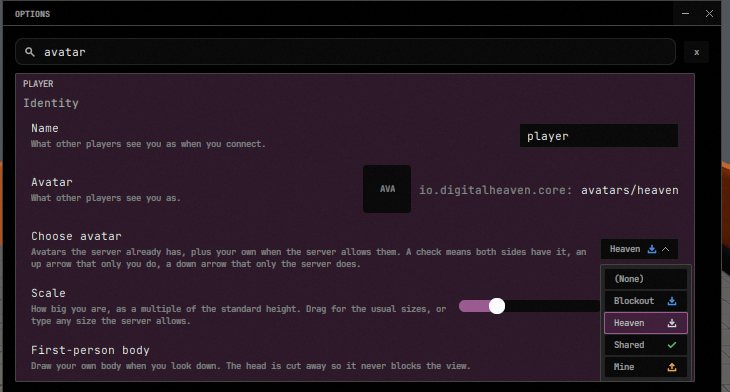
Desktop, iOS, and Android use these same rows and the same catalog-to-picker feed. Mobile lists avatars from its installed pallet library and the connected server, remembers an offline selection for the next join, and uploads locally installed worn content through the same avatar transfer path. Disconnecting removes the previous server’s choices rather than leaving stale options on screen.
Availability marks
Section titled “Availability marks”Each row in Choose avatar wears a small icon saying where that avatar actually lives. It is a fact, not a verdict: the state is read straight back out of the two collections the host already feeds the model — the server’s list (ClientHost.Avatars.cs, SetServerOptions) and this machine’s (SetLocalOptions) — so nothing extra travels on the wire.
| Mark | State | Means |
|---|---|---|
check | Everywhere | Both this machine and the server have it |
upload | Local | Only this machine has it; wearing it costs an upload |
download | Server | Only the server has it |
(None) and any row in neither list wear no mark at all — a row with nothing to report says nothing. The same is true of every row while there is no server catalog to compare against at all — no session, or one whose catalog has not yet arrived — since residency on the server side is not a fact yet; marks appear the moment a catalog arrives and disappear again once the session ends.
The colors are preferences rather than constants, so they can be retuned from the console without a relaunch:
| Preference | Default (RGBA) | |
|---|---|---|
client.ui.avatarMark.local | 226, 176, 75, 255 | the upload mark |
client.ui.avatarMark.remote | 76, 143, 224, 255 | the download mark |
client.ui.avatarMark.everywhere | 92, 192, 108, 255 | the check mark |
client.ui.avatarMark.size | 12 | the mark’s side, in logical pixels |
client.ui.avatarMark.gap | 6 | the gap between the name and the mark |
The selected row’s mark is drawn in the row’s own selected-label color, not in its state color, so the chosen row reads as one object rather than as a name with a differently colored stranger beside it.
The row’s arrangement is fixed: the name left-aligned, the mark right-aligned. The collapsed chip has no right edge of its own to pin the mark to, so it groups the two instead, mark trailing the name with no gap of its own. A picker short enough to render as a segmented strip rather than a dropdown draws the same content through the same builder.
Scale is the ordinary settings slider, bound straight to client.scale, so dragging it resizes the pawn as it moves. Its ends follow the session: the server’s server.playerScale.min/.max while playing, the client’s own client.scaleMin/client.scaleMax otherwise, re-read on every draw so a join, a leave, or an operator retuning the bounds mid-session all move the slider’s range under the handle. Where the avatar rows are conditional on there being a picker, the size row is not — a host with no catalog still has a size, and on a phone the slider is the only way to set one.
In a mod’s config window
Section titled “In a mod’s config window”The overlay’s config window drives the same model. A mod host has no server catalog to feed — its sync is peer to peer — so it simply never feeds the server half, which is why nothing in the model assumes a server exists. Its local half comes from LocalAvatarOptions.Enumerate, which reads every .dh-avatar the host’s installed pallets ship; an avatar whose definition will not parse still yields a row, named by its file, because a file a player could wear is not hidden because its name would not parse.
The server’s avatar catalog
Section titled “The server’s avatar catalog”A picker can only say “this one costs no upload” if it knows what the server holds. ServerAvatarCatalogSource is that list: the avatars the server can enumerate in its own pallets, plus the closures players have already uploaded to it, deduped by barcode. Both halves mean the same thing to a picker, which is why they are one list. The local half wins a tie — it was read out of a pallet, so it carries the definition’s real name and its picture, while an uploaded closure is known only by the barcode it arrived under and is named by that barcode’s file stem.
It travels as a blob, under two new kinds:
avatarCatalog— the list, serialized by the same codec the map catalog uses. Asked for with no hash, for the same reason: a client cannot fingerprint a list it has never seen.avatarThumbnail— one avatar’s picture, named by the fingerprint its catalog row carried.
Neither is gated on world authority. The two map kinds are an operator’s business — the map verb’s gate, silent refusal for anyone else — but what a server will let you wear is every admitted player’s business, and a server that hid it would only produce pickers that offer nothing. They are sibling kinds rather than widened map ones precisely because the gate is read from the kind alone: one if over the kind decides authority, and there is no second place where a map’s privacy could be spelled onto an avatar’s list.
There is still one serving path. AssetCatalogBlobSource routes by kind into the map half or the avatar half; the codec, the chunking, the content-addressed store and the client-side mirror are the map path’s, unchanged. On the client, RemoteAssetCatalog is the mirror for both — the same type, parameterized by which pair of kinds it is asking for.
The catalog blob carries a kind byte per row and a trailing display name (AssetCatalogCodec.FormatVersion 2). A peer too old to read that format sees no rows rather than wrong ones — an empty picker, never a lie.
An avatar’s picture
Section titled “An avatar’s picture”An avatar’s thumbnail is authored, never rendered. Drop a thumbnail.png beside the .dh-avatar — nova.dh-avatar takes nova.thumbnail.png — and dh build seals it into the pallet as the same companion entry a map’s photograph ships in, stamped against the definition it pictures. A map’s picture can be taken by a camera at build time; an avatar has no camera to take one with yet, so the authored file is the whole story.
The companion is the existing map-flavored one: the entry extension is .dh-mapthumb and the writer is MapThumbnailFormat, both unrenamed. The format is already asset-agnostic — width, height, a source hash and PNG bytes — and renaming it would have been a repo-wide rename of a shipped on-disk companion for a cosmetic gain. It is worth knowing when reading pallet contents: a .dh-mapthumb beside an avatar is that avatar’s picture, not a stray map.
An unreadable PNG warns and ships nothing; the row falls back to its AVA badge, which is what every row with no picture does.
Forgetting what nobody wears
Section titled “Forgetting what nobody wears”Two barcodes are two entries in the object mesh cache, so a swap leaves the old avatar behind unless something goes looking for it. The slot bookkeeping does a census: ReplicatedAssetSlots — the shared per-entity asset-slot record both player pawns and spawned assets already use — evicts content nothing is wearing any more. A swap, a player leaving, a reload of the same barcode and an outright unload all go through the one path, so there is no case where the cache grows because a particular door was used.